Open HuggingChat → MCP Servers panel → Custom Servers → "Add Your First Server."
First Break AI

What's New
For builders — fully agentic Install the First Break AI MCP server & CLI — AI agents built in Model Context Protocol · AI Agents · Agentic AI · HuggingChat · Claude · Cursor · Codex · npm CLI · Docs
First Break AI is completely agentic — every part of the cohort is powered by AI agents. The live MCP server (Model Context Protocol) lets AI assistants call cohort tools over HTTP: answer questions, validate homework, track progress, and guide you through the roadmap.
Add it once in HuggingChat, Claude Desktop, Claude Code, Cursor, or OpenAI Codex, and your AI agent can use cohort tools (ask, find, validate, and more) without leaving the chat.
Same URL on every client card below — or copy the config snippet that matches your tool.
Settings → Developer → Edit Config → paste under mcpServers (uses mcp-remote shim). Restart Claude Desktop after saving.
Terminal: claude mcp add --transport http fba-cohort <url> — or add to ~/.claude.json / project .mcp.json. Run /mcp in a session to verify.
Settings → Features → Model Context Protocol → add server, or edit ~/.cursor/mcp.json / .cursor/mcp.json with a remote url entry.
Add to ~/.codex/config.toml under [mcp_servers.fba-cohort] — or run codex mcp in the CLI. Then /mcp in a session to verify.
What can my AI actually do with FBA installed?
ask— answer any cohort question using the FBA roadmap, lessons, FAQ.do— enroll you, send the Discord invite + welcome email.find— locate specific lessons, steps, or office-hours topics.validate— judge your submitted work against the rubric and unlock the next step.next— tell your AI what to ask you next so you keep moving.
Want a local CLI too? Install the npm package
The @aiedx/firstbreakai npm package gives you a terminal CLI and a local MCP server in one install:
npm install -g @aiedx/firstbreakaifirstbreakai doctor— check your dev environment (Git, Python, Quarto, HF CLI)firstbreakai init— scaffold a Quarto blog for Step 1firstbreakai validate 1— run local checks on your workfirstbreakai status/done/next— track and navigate your progressfirstbreakai ask "..."— query the FBA assistant from your terminalfirstbreakai mcp— start a local MCP server for Cursor, Claude Desktop, etc.
Or, if you'd rather stay on this page, .
Start here
Two ways into First Break AI
Pick a path — they're built to work together. Most learners ping-pong between the map and the lessons.
Cohort: 1 May 2026 — 31 July 2026 (3 months) Live
First Break AI is a free, community-driven cohort for anyone who wants their first break in AI — and the first cohort that is completely agentic. It doesn’t matter what you studied or where you work — what matters is that you’re ready to learn by doing. We focus on what matters: running and training models, understanding inference, building with AI agents, and shipping agentic AI products. AI agents are woven into every layer of the cohort: an agentic MCP server answers your questions, AI agents validate your code against rubrics, track your progress across devices, and guide you through the roadmap step by step. The agentic backbone is built on FetchLens.ai — the same platform that makes AI agent traffic visible to websites. Most learning is self-directed and peer-supported; the roadmap, checklist, and resources live in the open so you can contribute and others can follow. The goal is simple: upskill, build, showcase — and get that first role or first break in AI.
Who it’s for
You don’t need a specific degree. You need a starting point. This cohort is for anyone — students, professionals, career switchers, the simply curious — who wants their first real break in AI. No applications, no prerequisites. Follow the roadmap, build in the open, and let your work speak for itself.
Cohort lead: FireHacker (blog, TIL) · GitHub @thefirehacker · About
For teams: First Break AI for Teams — instructor-led, with team dashboards, custom projects, and enterprise billing. For compute providers: Partner with us — your platform becomes the curriculum, not just a coupon.
How AI agents enhance cohort learning
Traditional online courses give you videos and quizzes. First Break AI gives you AI agents that learn alongside you. Every part of this cohort is powered by agentic AI — real AI agents that answer your questions, validate your code, track your progress, and guide you through the roadmap in real time.
Here’s what makes an agentic AI cohort different from a course PDF:
- AI agents answer questions in context. The on-site AI assistant and CLI agent know the syllabus, the lessons, and your current step. Ask “What is GGUF?” and the AI agent answers from the cohort’s own knowledge base — not a generic web search.
- AI agents validate your work. When you finish a step, run
firstbreakai validatein your terminal. An AI agent checks your code, your repo, and your environment against the rubric — deterministically, no hallucinations. - AI agents track your progress. Log in with Discord and your AI agent syncs your progress across the CLI, the roadmap page, and the MCP server. Every validated step and completed lesson is tracked by AI agents on the backend.
- AI agents integrate with your IDE. Install the MCP server in Cursor, Claude Desktop, Claude Code, or OpenAI Codex. Your AI agent can call cohort tools (
ask,find,validate,next) directly from your coding environment — no context switching. - AI agents make the cohort scalable. Instead of one instructor answering every question, AI agents handle the repetitive work — so office hours can focus on the hard, nuanced discussions that only humans can have.
This agentic infrastructure is built on FetchLens.ai — the same platform that powers AI agent observability for websites. FetchLens makes First Break AI agentic by providing the MCP server backbone, the AI agent widget on every page, and the Discord-authenticated progress tracking that ties the whole experience together.
The result: AI agents don’t replace the instructor — they multiply the instructor. Every learner gets a personal AI agent that knows the curriculum and their progress. That’s the difference between a static course and an agentic AI cohort.
Ready to start your journey?
This is a free, community-driven cohort. To join, sign up on Discord — that’s where the cohort lives, where you get help, and where you connect with fellow learners.
Join Discord and start learning
Office Hours: Every Friday, 9:00 — 10:00 PM IST. Meeting link shared on Discord.
Recommended for learners aged 16+. If you are under 18, please join only with parent or guardian permission. By joining you agree to our Community Guidelines, Terms, and Privacy Policy.
Bonus · The Anatomy
Want the full picture?
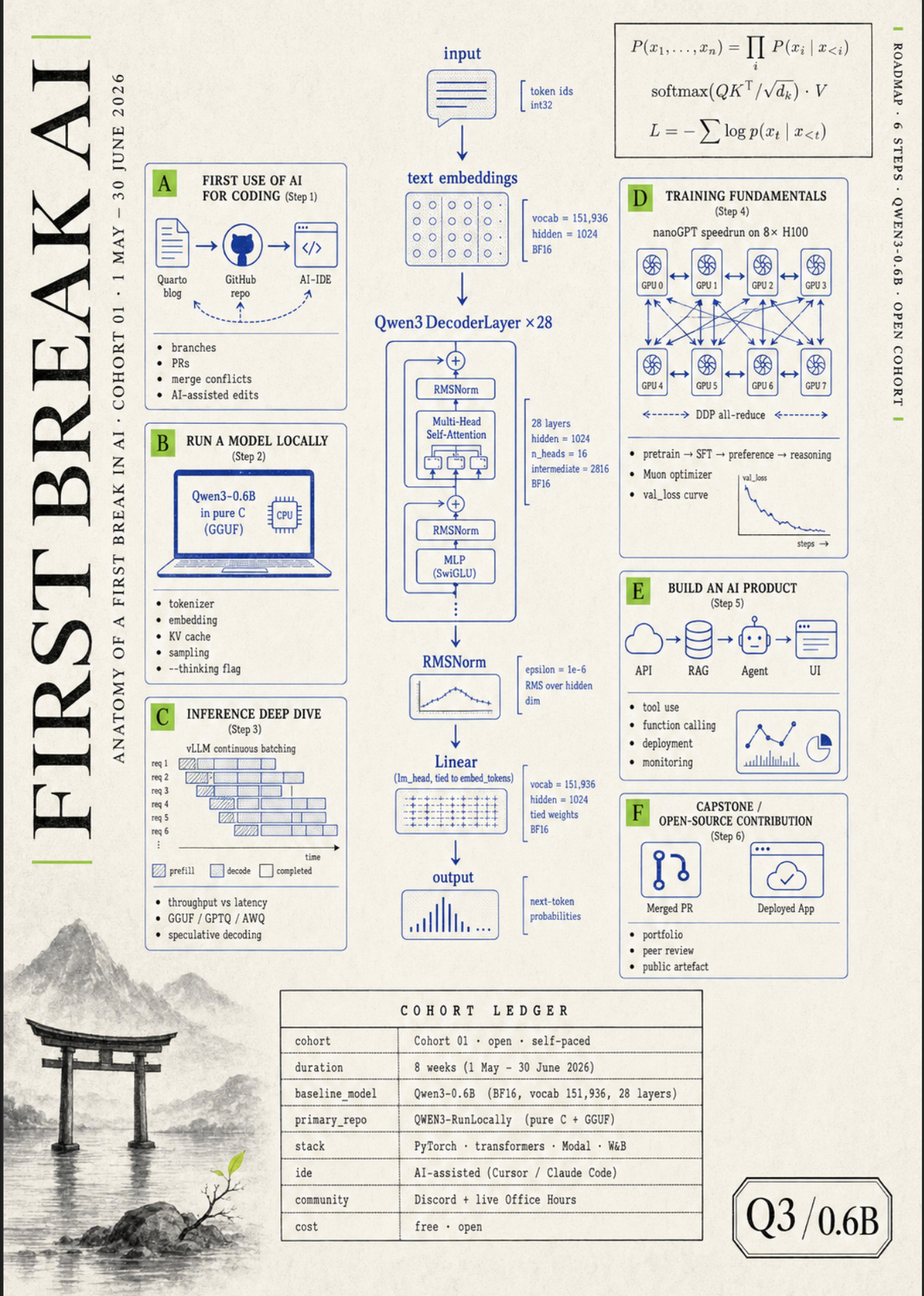
The cohort drawn as one inference flow — six steps, every detail on a single poster. Click to enlarge.
Get started
| Section | Description |
|---|---|
| Lesson 0: Welcome to First Break AI | Cohort intro video with interactive transcript — start here. Also on YouTube (full playlist) |
| Roadmap | Learning path: Quarto blog, local inference, training, and beyond |
| Checklist | Accounts to create (Hugging Face, GitHub, Fetchlens.ai, Colab) and who to follow |
| AI Setup | AI-based IDE (Cursor / Claude Code), ChatGPT, Open Router |
Frequently asked
Do I need to know math to take this course?
No. We deliberately go in reverse: start by running a model on your laptop, then add math (attention, RoPE, softmax) only when you have already seen the thing it describes. That is the same teaching approach Andrej Karpathy uses in Let's reproduce GPT-2.
Lesson 1's section "Do you need deep math for this?" goes deeper. If you have the math, great — it speeds you up. If you don't, what you can't skip is willingness to read code and run experiments.
Do I need a CS or tech background?
You need comfort with reading code (any language) and running terminal commands. That's the floor.
Past learners have come from career switches, design, math/econ/physics, and self-taught backgrounds. There are no applications and no prerequisites — the roadmap and checklist tell you exactly what to install on day one.
Is this really free? What's the catch?
Yes, free. No paywall, no upsell, no certificate-for-a-fee. For comparison, three current AI-engineering cohorts that audience-overlapping learners are already paying for:
| Length | Time / wk | Price | |
|---|---|---|---|
| Paid cohort A | 4 weeks | ~6 hrs | $2,000 |
| Paid cohort B | 8 weeks | 10–12 hrs | $2,000 |
| Paid cohort C | 6 weeks | 5+ hrs | (sold out) |
| First Break AI | 8 weeks | 5–8 hrs | $0 |
Same scope, free, longer cohort window. The catch is you have to show up — the cohort works because you build in public, not because we chase you.
How much time per week do I need to commit?
Plan for 5–8 hours a week to comfortably keep up — one lesson, Friday office hours, and the homework. Comparable paid cohorts ask for 5–12 hours per week, so this is in the same range.
Many learners spend more by choice; the roadmap goes deeper than the weekly minimum and the code is open. Cohort 01 runs 1 May 2026 – 31 July 2026, but everything stays online afterward, so you can also move at your own pace.
What hardware do I need? Mac, Windows, or do I need a GPU?
Any modern laptop is enough to start. We design the lessons CPU-first — for example, Lesson 1 runs Qwen3-0.6B in pure C on your laptop's CPU with no GPU required.
Mac (Apple Silicon or Intel), Windows (with WSL), and Linux all work. When the cohort hits larger training experiments in Step 4, the AI Setup page covers free-tier cloud GPU options.
Will I get a certificate or job placement?
No certificate, no placement service. What you walk away with is a portfolio: a Quarto blog of everything you learned, a model you trained from scratch, a deployed AI product, and optionally a merged open-source contribution.
In 2026, that portfolio is a much stronger hiring signal than a course PDF. Recruiters can see your blog and your GitHub commits; they can't see a certificate badge.
What if I miss a session, or join mid-cohort?
Everything is asynchronous-friendly. Office hours are recorded; lesson recaps and transcripts are interactive and searchable.
You can join Cohort 01 today, in three weeks, or after Cohort 01 ends — the materials stay online and the Discord stays active. Nobody is gated.
How is this different from fast.ai, Karpathy's lectures, or HuggingFace's free course?
First Break AI is openly inspired by Andrej Karpathy's Let's reproduce GPT-2 (124M) and llm.c — the from-scratch, no-magic, run-it-in-pure-C approach to teaching how LLMs actually work. Those are still the gold standard for a single lecturer building a model in front of you, and they are the philosophical foundation under this entire cohort. The pure-C Qwen3 demo in Lesson 1 (code by William Song) is the direct intellectual descendant of llm.c.
We sit on top of that work and extend it in four directions:
- Cohort-based. Live Friday office hours, 9–10 PM IST, where you can ask anything. Karpathy's lectures are one-way; this is two-way.
- 2026-current stack with AI agents. Qwen3 instead of GPT-2,
transformersv5, vLLM, AI agents, agentic AI tooling, MCP, and the HuggingFace supply-chain lens — but the teaching philosophy (run the model first, study the math after) is Karpathy's, applied to today's models and agentic workflows. - Shipping a product is in scope. Step 5 of the roadmap is building a deployed AI product, not just training a model in a notebook.
- Completely agentic, by design. First Break AI is built around AI agents from day one. The cohort ships a public MCP server, a CLI with built-in AI agent tools, an on-site AI assistant widget, and structured data (
Course,FAQPage) for AI answer engines. Your AI agent can enroll you, validate your homework, track your progress, and guide you through the roadmap — all via standard agentic protocols (MCP). Lesson 1 walks you through Croissant — the same machine-readable lens, applied to model and dataset releases.
fast.ai and HuggingFace's free course are excellent complementary reads, and the Roadmap links to them where they fit.
How do AI agents help students learn in a cohort?
AI agents transform cohort-based learning by giving every student a personal agentic AI tutor that knows the syllabus, the lessons, and the student's current progress. In First Break AI, AI agents answer questions from the cohort knowledge base, validate homework against rubrics, track progress across devices, and guide learners through the roadmap — all in real time.
Unlike static courses where you watch videos alone, an agentic AI cohort like First Break AI uses AI agents to close the feedback loop instantly: you write code, the AI agent checks it, tells you what passed and what didn't, and suggests your next step. This is what makes agentic AI different from a chatbot — the AI agents take real actions (validate, enroll, track progress), not just answer questions.
The agentic infrastructure behind First Break AI is built on FetchLens.ai, which provides the MCP server, the AI agent widget on every page, and the authenticated progress tracking. FetchLens makes it possible for AI agents to operate across the website, the CLI, and AI IDEs like Cursor and Claude — giving learners a seamless agentic experience regardless of where they're working.
Research shows that immediate, personalized feedback is the single biggest driver of learning outcomes. AI agents deliver that at scale — every learner gets the equivalent of a teaching assistant available 24/7, powered by agentic AI.
Is there a CLI or npm package for the cohort?
Yes. Install @aiedx/firstbreakai from npm to get a terminal CLI and local MCP server in one package.
The CLI checks your dev environment (firstbreakai doctor), scaffolds a Quarto blog (firstbreakai init), tracks your cohort progress (firstbreakai status/done/next), validates exercises locally (firstbreakai validate), and lets you ask the AI assistant from the terminal (firstbreakai ask).
Run firstbreakai mcp to start it as a local MCP server for Cursor, Claude Desktop, or Claude Code. Full documentation is on the Docs page.
Does the First Break AI cohort have an MCP server?
Yes — and it's a core part of what makes First Break AI completely agentic. First Break AI publishes a free, public MCP server (Model Context Protocol) so your AI agent can talk to the cohort directly — search lessons, answer roadmap questions, help with enrollment, validate homework, and track your progress.
The server uses Streamable HTTP (the current MCP transport). Install it in HuggingChat, Claude Desktop, Claude Code, Cursor, or OpenAI Codex by pasting one URL or config snippet. Step-by-step cards are in the Install the First Break AI MCP server section at the top of this page.
Tools exposed by the server include ask (cohort Q&A from lessons and FAQ), find (locate lessons and office-hours topics), do (enroll and Discord invite), validate (check submitted work), and next (suggest your next step). The on-site Ask Anything AI assistant widget uses the same agentic backend — no install needed.
No API key is required for read-only cohort tools; the cohort teaches agentic AI by having you install the same MCP server you learn from — the same “agent-readable supply chain” idea as Lesson 1’s Croissant walkthrough, applied to the cohort itself. You don't just learn about AI agents — you use them throughout the cohort.