First Break AI
Two ways into First Break AI
Pick a path — they're built to work together. Most learners ping-pong between the map and the lessons.
Cohort: August 2026 — September 2026 Live
First Break AI is live and fully agentic. The first few steps live right here — set up your Quarto blog, run a model locally, and go deep on inference through the roadmap and lessons. No applications, no prerequisites.
The next steps continue in FBA Lab — an interactive, hands-on lab with real model code, synced architecture diagrams, and live terminal logs. No GPU, no setup, no account required to start. Learn the fundamentals here, then build for real in the lab.
Cohort 01: 1 May 2026 — 30 June 2026 Archived
Cohort 01 was the first fully agentic First Break AI cohort — live + async, guided end to end by AI agents. It is now archived, but nothing is lost: every lesson, office-hours recording, and interactive transcript stays online to work through anytime.
Who it’s for
You don’t need a specific degree. You need a starting point. This cohort is for anyone — students, professionals, career switchers, the simply curious — who wants their first real break in AI. No applications, no prerequisites. Follow the roadmap, build in the open, and let your work speak for itself.
Cohort lead: FireHacker (blog, TIL) · GitHub @thefirehacker · About
For teams: First Break AI for Teams — instructor-led, with team dashboards, custom projects, and enterprise billing. For compute providers: Partner with us — your platform becomes the curriculum, not just a coupon.
Ready to build?
The cohort is live and fully async. Start the first steps here, then continue hands-on in FBA Lab — no GPU or setup required.
Focused sessions run when there is real work to review: demos, project submissions, debugging, training runs, or walkthrough requests.
Recommended for learners aged 16+. If you are under 18, please join only with parent or guardian permission. By joining you agree to our Community Guidelines, Terms, and Privacy Policy.
Want the full picture?
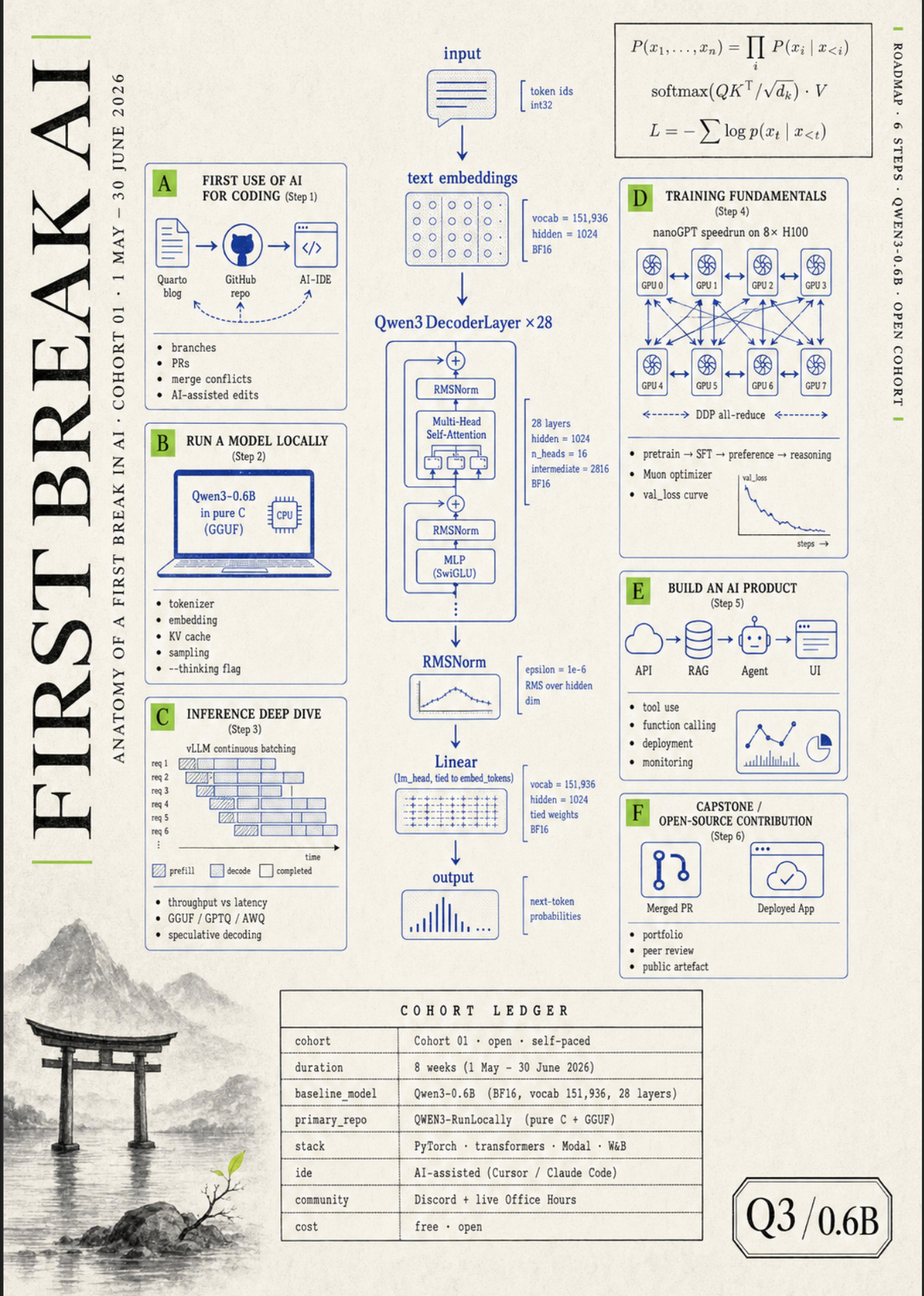
The cohort drawn as one inference flow — six steps, every detail on a single poster. Click to enlarge.
Get started
| Section | Description |
|---|---|
| Lesson 0: Welcome to First Break AI | Cohort intro video with interactive transcript — start here. Also on YouTube (full playlist) |
| Roadmap | Learning path: Quarto blog, local inference, training, and beyond |
| FBA Lab | The interactive lab for your next steps — real model code, diagrams, and live terminal logs. No GPU or setup. |
| Checklist | Accounts to create (Hugging Face, GitHub, Fetchlens.ai, Colab) and who to follow |
| AI Setup | AI-based IDE (Cursor / Claude Code), ChatGPT, Open Router |
Frequently asked
What is FBA Lab?
FBA Lab is where First Break AI is heading. Cohort 01 started as a live + async cohort. The signal was clear: serious learners need a better way to touch real AI systems directly — not more passive sessions.
FBA Lab is the new hands-on front door. It brings together real model code, synced architecture diagrams, terminal logs, and explanations that move together — so you can see how inference, training, and agentic AI actually work, step by step. No GPU required. No account required to start. No setup friction.
The cohort roadmap, lessons, and office-hours archives stay online here. FBA Lab is where new hands-on content is being built.
Do I need a CS or tech background?
You need comfort with reading code (any language) and running terminal commands. That's the floor.
Past learners have come from career switches, design, math/econ/physics, and self-taught backgrounds. There are no applications and no prerequisites — the roadmap and checklist tell you exactly what to install on day one.
How much time per week do I need to commit?
Plan for 5–8 hours a week to comfortably work through the lessons and roadmap. The async materials are self-paced — there is no required weekly commitment.
Cohort 01 ran 1 May 2026 – 30 June 2026 and is now archived. Everything stays online, so you can move at your own pace.
What hardware do I need? Mac, Windows, or do I need a GPU?
Any modern laptop is enough to start. We design the lessons CPU-first — for example, Lesson 1 runs Qwen3-0.6B in pure C on your laptop's CPU with no GPU required.
Mac (Apple Silicon or Intel), Windows (with WSL), and Linux all work. When the cohort hits larger training experiments in Step 4, the AI Setup page covers free-tier cloud GPU options.
Will I get a certificate?
All content in First Break AI and FBA Lab is free. For a certificate, log in to FBA Lab and request access.
What if I miss a session, or join mid-cohort?
Everything is available to learners — all lessons, recaps, and transcripts stay online and searchable.
New events and sessions are active, and the Discord stays open. You can join and start anytime.
How is this different from fast.ai, Karpathy's lectures, or HuggingFace's free course?
First Break AI is openly inspired by Andrej Karpathy's Let's reproduce GPT-2 (124M) and llm.c — the from-scratch, no-magic, run-it-in-pure-C approach to teaching how LLMs actually work.
fast.ai and HuggingFace's free course are excellent complementary reads, and the Roadmap links to them where they fit.