Office Hours — 8 May 2026
First Break AI — Office Hours
Session 5 — 8 May 2026 · Cohort 01 — Session 1. The first live office hours of the cohort. We set the framing for the next eight weeks, walked through HuggingFace as the “GitHub for models,” ran Qwen3 locally in pure C, and answered the question every learner has on day one: do I need deep math for this?
What we covered
Topic 1: Three intuitions about LLMs
Roadmap connection: Step 2 — Run a model locally
If you only walk away with three things from this session, walk away with these. Every concept in the cohort — tokenization, attention, training loss, sampling — will fit on top of these three pictures.
Intuition 1 — A model is a stack of repeated blocks
Open any modern LLM and the architecture has the same skeleton: an input → an embedding lookup → a tower of identical decoder blocks → a normalisation step → a linear projection → an output. Qwen3-0.6B looks like this:
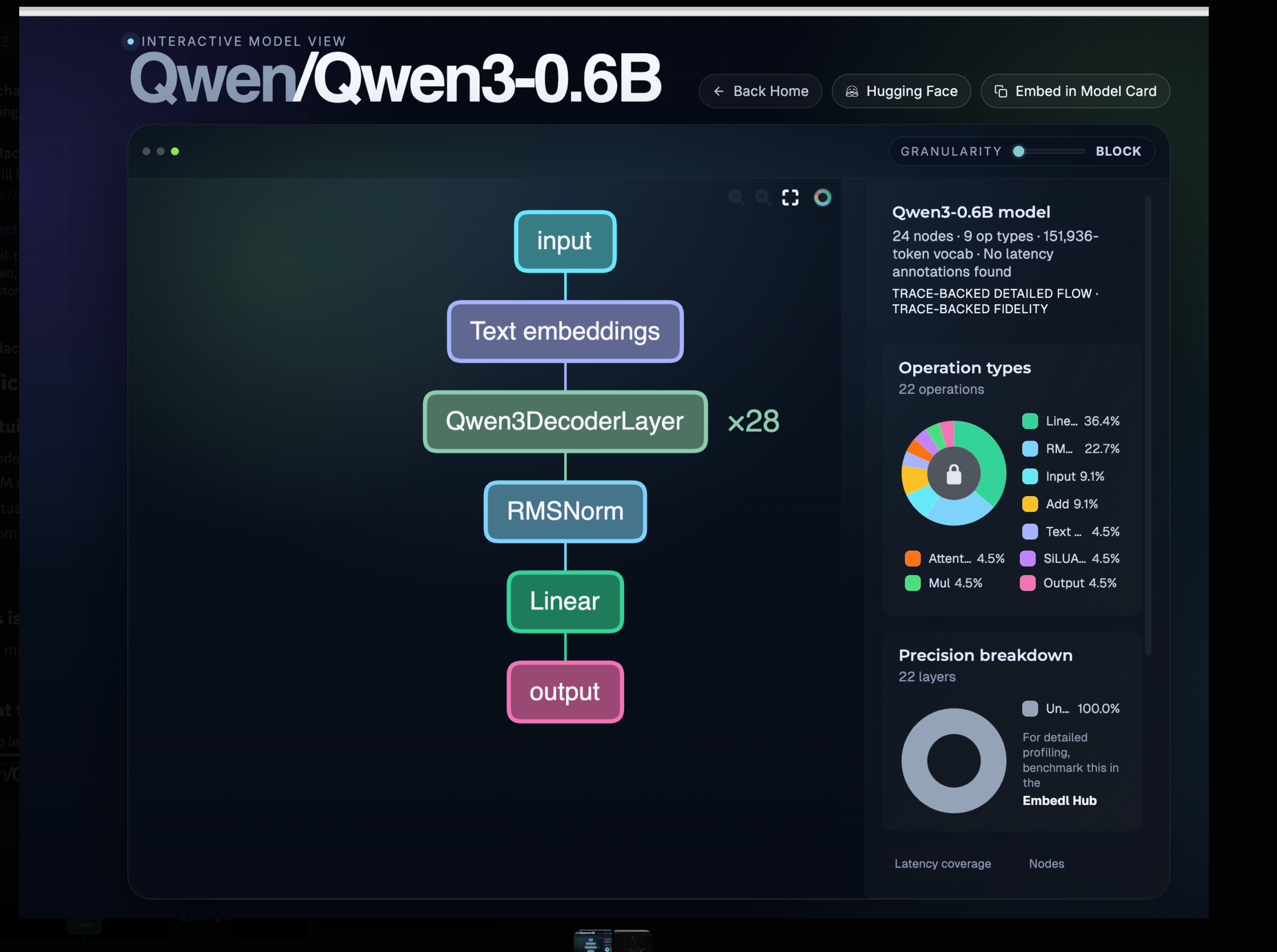
What to notice:
Qwen3DecoderLayer × 28— the entire “depth” of the model is the same block stacked 28 times. Once you understand one block (attention + MLP + normalisation), you understand the whole tower.151,936tokens — that is the vocabulary size. Every input word/symbol/sub-word maps to one of these IDs.- Operation types —
Linearis ~36% of operations andRMSNorm~23%. Most of an LLM is matrix multiplications and normalisations; the “magic” lives in the weights, not in exotic operators.
You can explore this view yourself: hfviewer.com/Qwen/Qwen3-0.6B.
Intuition 2 — LLMs are autoregressive: one token at a time
LLMs do not “write a sentence.” They generate one token, append it to the input, then generate the next token. That loop is called autoregressive decoding. Whether you ask a question, ask for code, or ask for a full app, it is always the same shape: input → some processing → output, one token at a time.
prompt: "Write a sonnet about love."
step 1 → "In"
step 2 → "In twilight's"
step 3 → "In twilight's hush,"
step 4 → "In twilight's hush, where"
... and so on
The InfoLens space makes this visible — every generated token is connected back to the prompt tokens it was paying attention to:
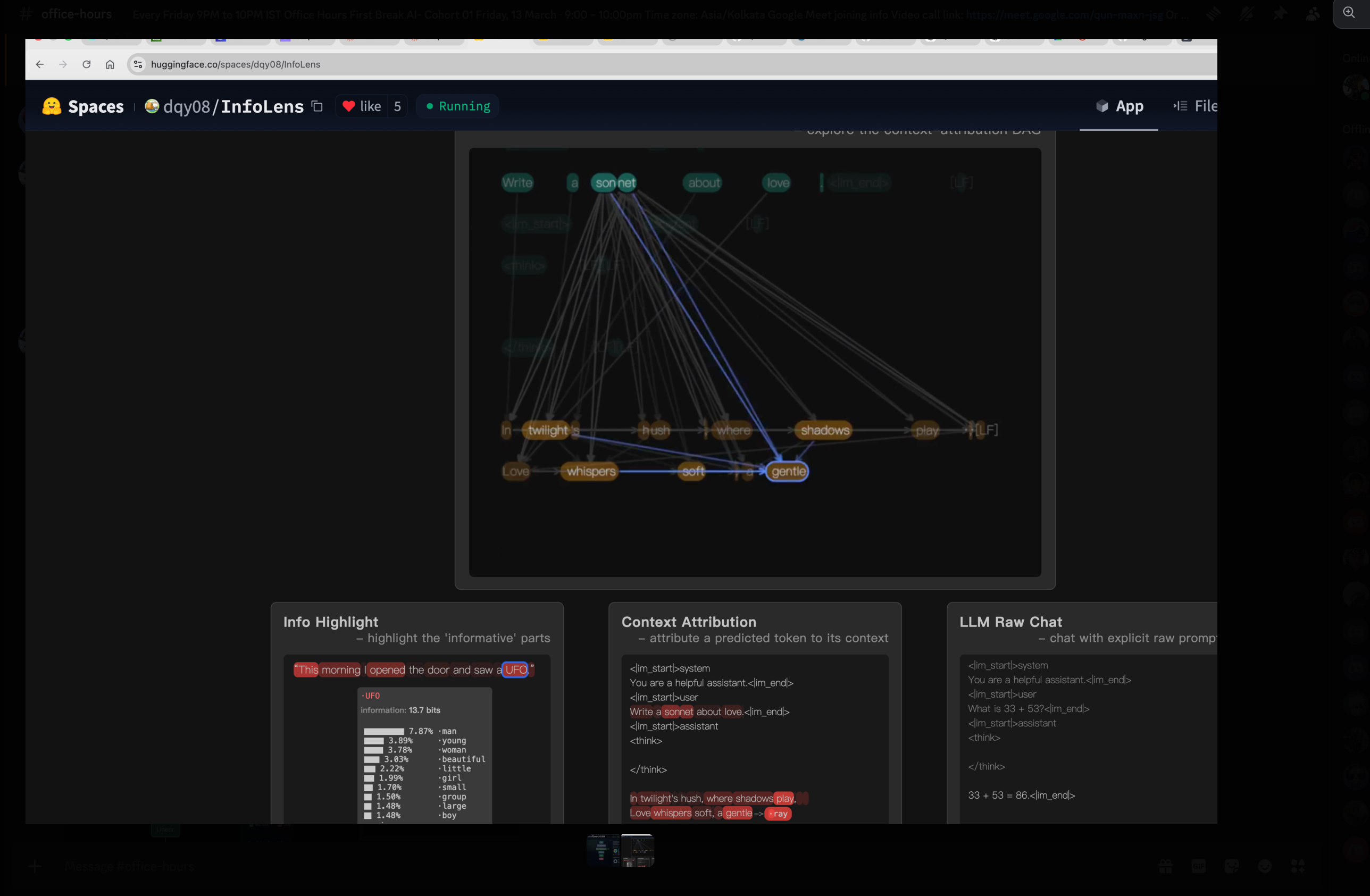
Try it live: huggingface.co/spaces/dqy08/InfoLens.
Why this matters: every architectural detail — the KV cache, attention masks, sampling temperature — exists to support this one-token-at-a-time loop efficiently and controllably.
Intuition 3 — The model outputs a probability distribution over the entire vocabulary
This is the intuition learners miss most often.
When the model is “predicting the next token,” it is not picking one word. At every step it produces a probability for every single one of the ~150K vocabulary tokens (151,936 for Qwen3). The “output” you see is just the result of sampling from that distribution.
At step k, the model emits a vector of length 151,936:

  token_id 0   →  0.0001
  token_id 1   →  0.0003
  ...
  token_id 9821 ("twilight")  →  0.342   ← high
  token_id 9822 ("twinkle")   →  0.118
  ...
  token_id 151935 →  0.0000

Sampling step picks one — usually the most likely, or
weighted by temperature / top-p / top-k.
This is why temperature and top-p can change a model’s output without changing the model: they reshape how aggressively we sample from this distribution.
Mental model lock: A model is a stack of identical blocks (Intuition 1) that repeatedly turns a context into a vocab-sized probability vector (Intuition 3) and we sample from that vector one token at a time (Intuition 2). Everything else in the cohort is detail filling in those three pictures.
Topic 2: Why Qwen3 0.6B — small but structurally identical
Roadmap connection: Step 2 — Run a model locally
A common reaction in office hours: “600 million parameters? Isn’t that tiny? GPT-4 is hundreds of billions.”
Yes — and that is exactly the point.
| Model class | Parameters | Notes |
|---|---|---|
| Frontier (Claude, GPT-4-class) | 200B – 300B+ | Closed weights, served via API |
| Mid-scale open | 7B – 70B | Llama, Mistral, Qwen mid-tier |
| Qwen3-0.6B | 600M | What we run in this cohort |
The architecture of Qwen3-0.6B is structurally the same as Claude-class models — same decoder-only transformer, same attention, same positional encoding family, same sampling. The differences are:
- Scale — number of layers, hidden dim, attention heads.
- Training data — Qwen3-0.6B was trained on far less data than a frontier model.
Because the shape is identical, learning Qwen3-0.6B teaches you the same mental model you need for the big ones — but with weights small enough to fit on a laptop, run on a CPU, and read end-to-end. It is the stepping stone for everything else in the roadmap.
Topic 3: HuggingFace — the GitHub for models
Roadmap connection: Step 2 — Run a model locally
If you understand GitHub, you already understand most of HuggingFace.
| GitHub | HuggingFace |
|---|---|
| Source code repos | Models repos |
| README.md | Model card (still a README.md) |
| Issues, PRs, branches | Issues, PRs, branches |
| Stars, forks | Likes, downloads |
| Releases | Model files (.safetensors, .bin, .gguf) |
| Datasets (sometimes) | Datasets as a first-class section |
| GitHub Pages | Spaces (interactive demos) |
Three top-level sections to know on the HF site:
- Models — the LLMs themselves
- Datasets — the training/eval data
- Spaces — runnable demos (we used InfoLens earlier)
How big are these things?
Massive — and not the way most learners expect. One older model alone had ~18 million downloads in the previous month. When you publish an open model, you are publishing infrastructure that millions of people pull.
Why HuggingFace exists at all — the large-blob problem
Source code is small text files. Models are gigabytes of binary weights. GitHub has a ~100 MB hard limit on individual files without special tooling — push a 5 GB .safetensors to vanilla Git and the push fails.
GitHub solved part of this with Git LFS (Large File Storage) — a layer on top of Git that stores big blobs separately and replaces them in the repo with small pointer files. HuggingFace started here too. They have since moved beyond LFS to Xet, a content-addressed storage system designed specifically for the access patterns of model files (chunk-level dedup, faster downloads, better behaviour for the every-five-minutes-someone-pulls-7-billion-parameters workload). When you see a model file marked with the Xet indicator on a HF repo, that is what is happening underneath.
What you actually see in a model repo:
| File | What it is |
|---|---|
README.md |
The model card — license, prompt format, eval scores, examples |
config.json |
The architecture (we will dig into this in Topic 4) |
tokenizer.json / tokenizer_config.json |
The tokenizer’s vocabulary and rules |
model.safetensors (or pytorch_model.bin) |
The actual weights — billions of floats |
*.gguf |
A different on-disk format optimised for CPU inference (Topic 7) |
Good model providers (the Qwen team is one) write detailed model cards: prompt template, supported languages, eval numbers, known limitations. Bad providers ship just weights and let you guess. The model card is one of the best signals of how seriously a release is being maintained.
Topic 4: config.json and the Transformers library
Roadmap connection: Step 2 — Run a model locally
config.json is the single most important small file in a model repo. It describes the architecture — number of layers, hidden size, number of attention heads, vocabulary size, RoPE settings, activation function, everything you need to reconstruct the model in code before you load the weights.
weights file (.safetensors)  →  just numbers
config.json                  →  the shape they go into
Without config.json, the bytes in .safetensors are meaningless.
The Transformers library
transformers — the library, created and maintained by HuggingFace — is the standard way to use these models from Python. The pattern is always the same:
from transformers import AutoModelForCausalLM, AutoTokenizer

tokenizer = AutoTokenizer.from_pretrained("Qwen/Qwen3-0.6B")
model     = AutoModelForCausalLM.from_pretrained("Qwen/Qwen3-0.6B")

inputs  = tokenizer("Why does attention work?", return_tensors="pt")
outputs = model.generate(**inputs, max_new_tokens=200)
print(tokenizer.decode(outputs[0]))
What transformers does behind that two-line load:
- Reads
config.jsonfrom the repo - Picks the right model class (e.g.
Qwen3ForCausalLM— see the source) - Builds the architecture from the config
- Streams the weights from
.safetensorsinto the right tensor slots - Returns a ready-to-call PyTorch model
The whole rest of the cohort sits on top of this loop. Everything else is either making it faster (Step 3 — inference engines), training one of your own (Step 4), or building a product around it (Step 5).
Topic 5: Markdown everywhere — and Karpathy’s AI-managed knowledge base
Roadmap connection: Step 1 — First use of AI for coding
Model cards are markdown. Issues and PRs on GitHub are markdown. Discord posts use markdown. Even the task lists you write for yourself in your IDE are markdown.
Markdown is not a “documentation format” — it is the lingua franca of AI-assisted work. If you are not fluent in it, you will spend the cohort fighting your own tooling.
The basics, with a quick sandbox to try them in: dillinger.io — a browser-based markdown editor with live preview. Write headings, lists, links, code blocks, tables. Five minutes is enough.
Karpathy’s evolving knowledge base
A learner asked about Andrej Karpathy’s recent suggestion to “use markdown files as a database.”
The clarification: Karpathy is not advocating markdown as a relational database. He is describing a personal, evolving knowledge base — a tree of markdown files that an AI agent (Claude Code, Cursor, etc.) can iterate on, enrich, and re-organise as your understanding grows. The AI reads, writes, and restructures markdown the way a junior researcher would update a notebook. The format is markdown precisely because:
- It is human-readable when the AI is wrong
- It diffs cleanly in Git
- Every model on Earth has been trained to read and write it fluently
This is a workflow recommendation, not a data-storage architecture. The takeaway for the cohort: start a markdown notebook now. Drop everything you learn into it. Let your AI tools enrich and reorganise it as you go.
Topic 6: Q&A — do I need deep math to contribute to open source?
Roadmap connection: Roadmap overview
A learner raised this honestly: “I do not have a strong math background. Should I even be in this cohort? Can I contribute to open source without that?”
Short answer: no, you do not need deep math up front. We go in reverse.
The cohort’s approach:
- Start from inference — get Qwen3 running locally, watch it generate tokens. This needs zero math beyond reading numbers off a screen.
- Add concepts only when they unlock something practical. When attention starts mattering for what we are doing, we cover attention. When RoPE matters, we cover RoPE. Not before.
- Math becomes legible because you have already seen the thing it describes. Reading the attention equations after you have watched 28 decoder layers run on your laptop is a very different experience from reading them cold.
This is the opposite of how a typical ML course is structured (math → code). It is the same approach Karpathy uses in his “Let’s reproduce GPT” lectures, and it is how most working ML engineers actually learnt — by running models, breaking them, and then picking up the math piece by piece.
If you have the math, great — it will accelerate you. If you do not, that is fine — you can ship real work in this field without it. What you cannot skip is willingness to read code and run experiments.
Topic 7: Live demo — Qwen3 in pure C with GGUF
Roadmap connection: Step 2 — Run a model locally
Topic 4 covered loading via transformers (Python + PyTorch). For learning, we go further: ignore transformers entirely and run the model with a tiny C program. This is the cohort’s “from first principles” approach.
Why pure C?
- No abstractions to hide behind — every step from token IDs to logits is in code you can read.
- No GPU required — the demo runs on your laptop’s CPU.
- Same architecture, just spelt out — the C code is functionally an exact version of what
Qwen3ForCausalLMdoes insidetransformers.
GGUF — the file format
Instead of .safetensors (the format transformers likes), we use .gguf — a single self-contained file that bundles weights, tokenizer, and config in a CPU-friendly layout. GGUF is the format of choice for tools like llama.cpp and is what makes “run a real LLM on a laptop CPU” tractable.
The repo
github.com/thefirehacker/QWEN3-RunLocally — clone it, follow the README.
make run \
  --model qwen3-0.6b.gguf \
  --system "You are an AI expert running orientation for new hires at Accenture." \
  --thinking on \
  --multi-turn on
Two pieces of that command worth pausing on:
System prompt
The --system flag lets you set a system prompt — the role the model adopts before any user message. In the demo we made the model an “AI expert running orientation for new hires at Accenture,” and a 600M-parameter model produced perfectly competent answers about transformer architecture, attention, and training. The architecture is the same as Claude’s; only the scale and training data differ. Once you have seen this with your own eyes, large models stop feeling magical.
--thinking and --multi-turn flags
Two hyperparameter-style flags worth understanding now, because they will come back in every lesson:
| Flag | What it does |
|---|---|
--thinking on |
Enables the model’s internal reasoning trace (the <think>...</think> block). The model spends extra compute “thinking out loud” before producing its real answer. Same idea as the deliberation step you see in ChatGPT-style products. Costs more compute → typically gives better answers. |
--multi-turn on |
Keeps conversation history between turns. With it off, every prompt is a fresh start. With it on, the model carries the previous turns as context — and you start to see the KV cache earn its keep. |
The takeaway: hyperparameters are levers. thinking trades compute for quality. Sampling temperature trades determinism for creativity. Most of the “tuning” you will do for the rest of the cohort is some flavour of this same trade.
Topic 8: From a random model to Qwen3 0.6B
Roadmap connection: Step 4 — Training fundamentals
Today, Qwen3-0.6B has 600M parameters and writes coherent essays. It started with random numbers. Every weight in that 600M-parameter tensor was initialised from a random distribution.
So how does a random model become Qwen3?
Random weights
  ↓  pretrain on trillions of tokens (next-token prediction)
Base model — fluent text continuation, no instruction following
  ↓  supervised fine-tuning (instruction–response pairs)
Instruct model — answers questions, follows instructions
  ↓  preference optimisation (DPO / RLHF / similar)
Aligned model — preferred outputs, refuses harmful requests
  ↓  reasoning / "thinking" training (long chain-of-thought traces)
Thinking model — Qwen3 with <think>...</think> on
What changes at each stage:
| Stage | Data shape | What the model learns |
|---|---|---|
| Pretraining | Raw text (web, code, books) | Statistical structure of language — the next token task |
| SFT | (prompt, ideal response) pairs |
To produce answers, not just continuations |
| Preference | (prompt, better, worse) triples |
Which of two valid responses humans prefer |
| Reasoning | Long traces with <think> segments |
When and how to “think out loud” before answering |
Key takeaway for Cohort 01: when we train our own small GPT in Step 4, we are reproducing only the first stage — pretraining — at toy scale. That is the hardest stage to get right and the one that defines almost all of a model’s capability. Everything later is shaping a model that already exists; pretraining creates it.
Topic 9: Course framing — Karpathy’s “Let’s reproduce GPT,” Qwen3 edition
Roadmap connection: Roadmap overview
If you have seen Andrej Karpathy’s “Let’s reproduce GPT-2 (124M)” lecture, that is the spiritual ancestor of this cohort. Karpathy walks from an empty file to a working GPT-2 trained on FineWeb. We are doing the same — with Qwen3, on the modern PyTorch + HuggingFace ecosystem, using a real cohort and live office hours to keep the pace honest.
The roadmap is your starting point
The roadmap is not a side-document — it is the spine of the cohort. Every video lesson, every office hours session, every Project Watch deep dive maps back to one of the six steps:
Step 1  →  AI-assisted coding / Quarto blog
Step 2  →  Run Qwen3 0.6B locally (we are here)
Step 3  →  Inference deep dive
Step 4  →  Training fundamentals — your own GPT
Step 5  →  Build an AI product
Step 6  →  Capstone or open-source contribution
If you ever feel lost, return to the roadmap, find the step you are on, and follow the linked lessons + office hours notes for that step.
Topic 10: What to expect — upcoming Step 2 video lessons
Roadmap connection: Step 2 — Run a model locally
The next batch of video lessons covers Step 2 in depth. The first of these — a blog post explaining the pure-C inference path and how it maps to the Qwen3ForCausalLM class in transformers — is the immediate follow-up from this session.
| Lesson topic | Why it matters |
|---|---|
| Pure C inference write-up | Map the C demo from Topic 7 onto the transformers Qwen3 class — the abstraction stops feeling like magic |
| Run Qwen3 0.6B locally | Move from “I read about LLMs” to “I have one running on my machine” — repo: QWEN3-RunLocally |
| HuggingFace basics | Models, datasets, spaces, tokens, the transformers library — the standard toolkit you will use for the rest of the cohort |
transformers’ Qwen3 class vs our pure C code |
Side-by-side: what the production library does and what the equivalent C inference loop looks like |
| Hyperparameters: temperature, thinking on/off, multi-turn | How sampling temperature reshapes the probability vector from Intuition 3, and how <think> mode toggles long reasoning traces |
| Tokenizer | Why ~150K vocab, how byte-pair encoding produces sub-word tokens, why this directly affects context length and cost |
| Embeddings | The first transformation in the model — turning a token ID into the dense vector the decoder layers actually operate on |
Reference reading while you wait
Qwen3ForCausalLM— modeling source — the actual implementation we will dissect.Qwen3ForCausalLM— transformers docs — the public-facing API and what each argument does.
Topic 11: Resources and links
Everything referenced in the session, in one place:
Visual intuitions
- hfviewer.com/Qwen/Qwen3-0.6B — interactive model architecture viewer (Intuition 1)
- InfoLens — huggingface.co/spaces/dqy08/InfoLens — visualise autoregressive generation and context attribution (Intuitions 2 & 3)
Code and docs
- QWEN3-RunLocally — the cohort repo for running Qwen3 locally in pure C with GGUF
modeling_qwen3.py(transformers) —Qwen3ForCausalLMimplementation- Qwen3 transformers docs — API reference
- HuggingFace
transformersdocs (top-level) — the library tour
Markdown and the AI-managed knowledge base
- Dillinger — markdown editor — quick browser-based markdown sandbox
Learning
- Karpathy — Let’s reproduce GPT-2 (124M) — the lecture this cohort is modelled on
- Scratch to Scale — Zachary Mueller (Maven) — advanced training cohort for learners who finish Step 4 and want to go deeper
Follow-ups from this session
- [Host] Push a blog post explaining the pure-C inference path and how it maps to the
Qwen3ForCausalLMclass intransformers. - [Cohort] Open the Qwen3 model viewer and the InfoLens space, play with both for 10 minutes — the three intuitions should feel concrete after.
- [Cohort] Clone QWEN3-RunLocally, get the pure-C demo running, try a system prompt of your own with
--thinking onand--multi-turn on. - [Cohort] Watch (or re-watch) Karpathy’s GPT-2 reproduction — it is the parallel track for what we are building.